Quick answer for school leaders
Attendance records need protection, but real school mistakes still need a safe correction path.
Unity lets schools keep submitted attendance locked by default, then allow narrow role-controlled corrections only when the school chooses.
For teachers
Fix honest mistakes without a long informal office process.
For admins
Control who can correct attendance and what can be changed.
For leaders
Protect trust without pushing daily exceptions outside the ERP.
Every school wants clean attendance records. They affect parent trust, safety, reporting, fee-linked processes, transport planning, and sometimes payroll or staff duty records.
So it is easy to say: once attendance is submitted, lock it.
That sounds safe. But in a real school day, it is not always enough.
A teacher may mark a student absent and later learn that the student was at a school activity. A bus arrival may be delayed. A student may enter class after the first period. A coordinator may spot a simple mistake only after the day has moved on.
In these moments, the school does not want a loose system where anyone can change anything. But it also does not want five phone calls, one WhatsApp message, and a manual note to fix one honest error.
Good attendance software has to respect both needs.
Why schools fear easy edits
School leaders are right to be careful about attendance changes.
Attendance is a trust record. Parents may receive alerts from it. Admin teams may use it for reports. Teachers may be questioned on it. Leaders may need to explain it later.
If edits are too easy, people lose confidence. If every past record can be changed without control, the system becomes weaker than paper.
That is why many schools prefer a strict lock. It feels safe. It creates a clear rule. It reduces argument.
But strict locks can create a second problem. Staff start working around the system.
They keep side notes. They message the office. They ask an admin to cancel and recreate records. They delay final submission because they are afraid of making a mistake. The official system stays clean, but the real workflow moves outside it.
That is not true control. It is hidden work.
The real need is controlled flexibility
The hidden need is simple: schools need attendance records that are hard to misuse but easy to correct when the correction is valid.
That means three things.
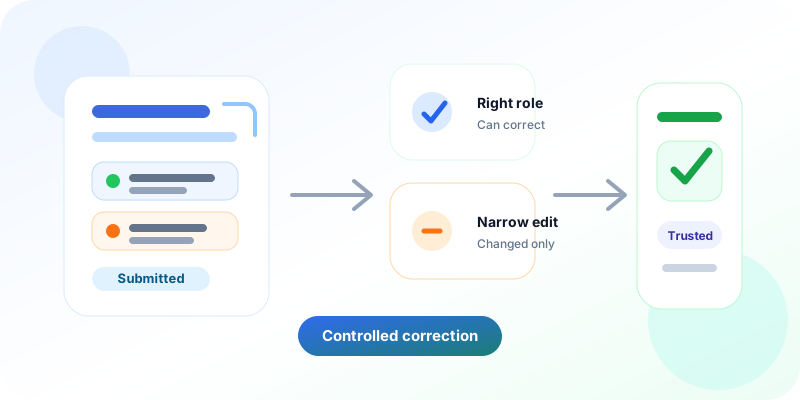
First, the school should decide if submitted attendance can be corrected at all. This should not be a hidden technical rule. It should be a clear school-level setting.
Second, only permitted roles should be able to use the correction. A class teacher, coordinator, principal, or admin may have different rights based on how the school works.
Third, the correction should be narrow. Most schools do not want old attendance opened fully. They want a safe way to correct real Present or Absent mistakes without disturbing the rest of the record.
This is where design matters.
This connects naturally with Unity’s attendance management, attendance device integration, and school administration workflows.
How Unity responds to the real school day
Unity’s attendance design is built around the fact that schools are careful for good reasons.
A school can keep the default lock. Nothing changes unless the school chooses to allow a specific exception.
If the school wants more flexibility, it can turn on controlled settings for attendance correction. It can also define which roles are allowed to use those settings.
This gives leaders a practical middle path.
A submitted attendance entry does not become an open sheet. A past-dated record does not become free for anyone to change. A correction is allowed only when the school has opted in and the user has the right role.
The system also focuses on changed students. If one student’s status needs correction, the school should not have to rewrite or disturb the whole class record. That saves time and reduces the risk of new errors.
What this changes for schools
For teachers, this reduces fear. They can complete attendance without feeling that one later correction will create a long office process.
For admins, it reduces follow-up work. They do not need to manage every small correction through informal messages.
For leaders, it protects trust. The system still has structure. The school decides who can act and when.
It also supports clearer parent communication. Attendance records can stay reliable while still giving the school a controlled way to fix honest mistakes. This fits with Unity’s broader parent communication and absent-note workflows.
Better software bends before it pushes
Many education systems fail because they assume schools only need stricter rules or faster screens.
But school operations are human. Teachers work in front of students. Admin teams handle parents, records, calls, and urgent exceptions at the same time. Principals need clean data, but they also know that real life creates edge cases.
A good ERP should not bulldoze this reality. It should bend around it first, then make the process cleaner.
Controlled attendance correction is a small example of a larger Unity belief: digitisation works best when it respects how institutions already protect trust.
Unity is not trying to make every process loose. It is trying to make the right process easier to follow.
That is the difference between software that only records attendance and software that helps a school run with confidence.
What this means for your institution
If your team still handles attendance corrections through calls, registers, or WhatsApp messages, the issue may not be staff discipline. It may be that your software does not offer the right level of control.
With Unity, schools can keep attendance strict where needed and flexible where reality demands it.
The result is simple: fewer manual corrections, fewer parent-confusing errors, less admin stress, and stronger trust in the record everyone depends on.
Want attendance corrections without chaos?
See how Unity helps schools protect daily attendance records while still giving authorised teams room to correct real mistakes.