Quick answer for school leaders
Parents trust absent-note workflows when the app gives them a clear answer before confusion reaches the school office.
Unity helps parents submit absent notes with clearer date guidance, cleaner parent-facing history, and fewer manual follow-up calls for the office.
For parents
Know what happened and what to do next.
For offices
Avoid repeat calls about unclear absent notes.
For leaders
Keep attendance communication easier to audit.
A parent opens the school app in the morning. Their child is unwell. They want to send an absent note quickly, then get back to the rest of the day.
That sounds simple. But in many schools, this small action can create a surprising amount of confusion.
The parent may not know if attendance has already been marked. The office may already have closed the record for that date. The app may show old entries that were created by a teacher or by the system. A parent may see words that make sense to staff, but not to a family trying to understand what happened.
This is not just a software issue. It is a trust issue.
When parents use a school app, they are not studying the process behind attendance. They are asking one basic question: “Has the school understood what I am trying to say?”
Unity is designed around that question.
Parents do not want technical answers
In a busy Indian school, attendance moves fast. A class teacher marks attendance. The office may review it. The school may submit it. Parents may send absence notes before school, during school, or later in the day.
All of these actions can be valid. The problem starts when the system gives a parent an answer that belongs to the back office.
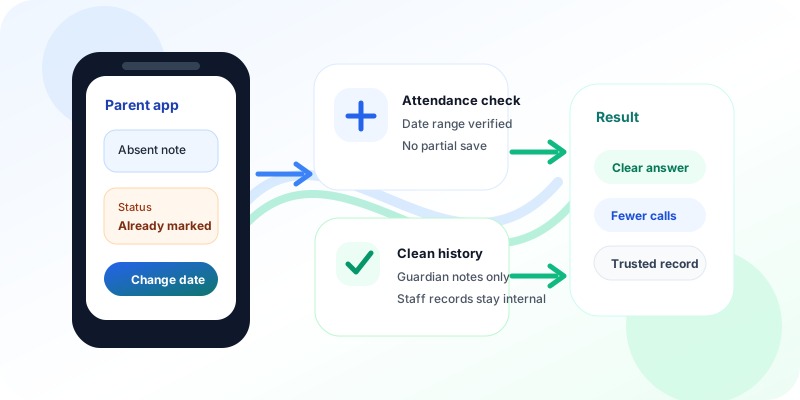
For example, if attendance is already marked for a date, a parent should not see a vague error. They should not be told to “try again” when trying again will not help. They should know what happened and what to do next.
A clear message changes the whole experience.
Instead of creating doubt, the app can say that attendance has already been marked for that date and ask the parent to select a different date range. The parent gets a useful answer. The school office gets fewer repeat calls. The record stays cleaner.
This connects naturally with Unity’s attendance management, mobile web application, and parent communication workflows.
The hidden need is confidence
Schools often think of absent notes as a form. But parents experience them as proof.
Proof that the school received the information. Proof that the absence was recorded correctly. Proof that the family will not be blamed later for not informing the school.
That is why the history screen matters too.
If parents open past leave notes and see entries created by teachers, internal draft records, or system-generated rows, they may think something is wrong. Even if the data is technically correct, the view is not useful for them.
Parents should see the notes they entered. They should see the real reason they gave. They should not have to decode internal attendance language.
Unity’s response is simple: show parents the parent-facing truth. Keep staff records where staff need them. Keep parent history clean, direct, and easy to trust.
Small details reduce work for everyone
A confusing absent-note flow does not stay inside the app. It reaches the front desk.
A parent calls to ask if the note was received. A class teacher checks WhatsApp. The office checks the attendance register. Someone asks the parent to resend the same information. A small gap becomes a small queue of work.
Unity reduces that queue by making the digital step more careful.
The app checks the selected dates before saving. If one date cannot accept an absent note, it stops clearly instead of saving part of the request and failing later. That matters because partial records are hard to explain.
It also keeps the past notes list focused on guardian-entered notes. This means parents are not distracted by staff-side updates that were never meant for them.
These are small product choices. But they match how schools actually run.
Good ERP respects school habits
Schools do not need software that assumes every parent, teacher, and admin follows the same perfect sequence every day. Real school life is messier.
Some parents inform early. Some inform late. Some children arrive after attendance. Some offices close records quickly because reports and safety checks depend on them.
Good school ERP does not bulldoze that reality. It gives each person the right next step.
For parents, that means clear messages and clean history.
For teachers, it means attendance can continue without confusion.
For administrators, it means fewer manual clarifications and records that are easier to audit.
For school leaders, it means parent communication becomes more reliable without adding another layer of work.
This is the same principle behind Unity’s early pickup and late drop records and the broader parent journey: school software should explain the next step without forcing families to understand internal back-office language.
Clear communication builds parent trust
Parent trust is built in small moments. Fee reminders. Attendance alerts. Pickup updates. Event photos. Absent notes.
Each moment tells families whether the school is organised, responsive, and easy to work with.
Unity does not treat these moments as minor screens. They are part of the daily relationship between the institution and the family.
That is why a better absent-note experience matters. It saves time for the office. It protects the attendance record. It gives parents a clear answer at the point where doubt usually begins.
A parent should not need to call the school to understand what the app means.
Unity helps schools make that answer clear the first time.
Want fewer absent-note follow-ups?
See how Unity connects attendance, parent apps, and communication workflows so parents get clearer answers and school offices avoid repeat clarification calls.